.svg)
October 2026 Software Update
What’s changing
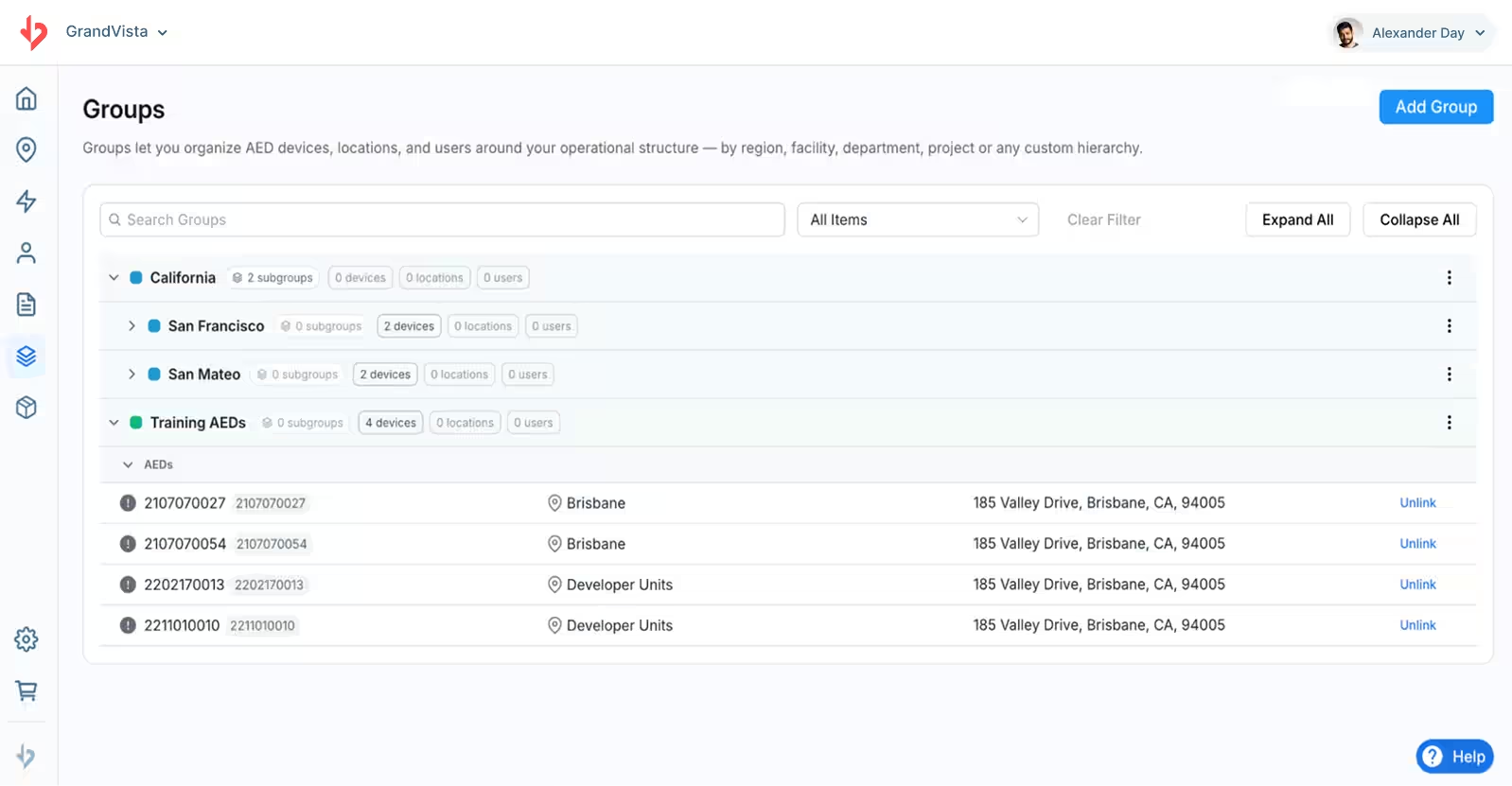
The October 2026 release introduces Groups, a new feature in REALConnect that gives organizations a more flexible way to organize and manage their AEDs, locations, and users.
With Groups, Administrators can build a structure that reflects how their Organization operates, whether that means organizing by region, facility, department, project, or another custom hierarchy. Nested groups make it easier to manage large AED programs, maintain visibility across an organization, and align REALConnect with existing operational structures.
For example, a multi-site organization could create groups for each region, with subgroups for individual facilities and departments. This structure helps Administrators organize resources in a way that mirrors their organization.
Who benefits
Groups is designed primarily forREALConnect users with Administrator permissions, who can create and manage groups to reflect their Organization’s structure, which makes it easier to identify, manage, and oversee AEDs across multiple locations or departments.
Both Administrators and Managers benefit from a more organized view of AEDs, locations, and Users.
New features
Build a Hierarchy That Fits Your Organization
Create a custom group structure based on how your Organization operates. Groups can represent regions, facilities, departments, projects, or any other organizational category that makes sense for your AED program.
Nested groups allow you to organize resources across multiple levels, from broad organizational divisions to individual teams or facilities.
Organize AEDs, Locations, and Users
Groups extends organization beyond AED devices alone. Administrators can assign AEDs, Locations, and Users to groups, bringing related resources together within the same organizational structure.
Assign Items to Multiple Groups
An AED, Location, or User can belong to multiple groups. This flexibility allows Organizations to organize the same resources in different ways without having to duplicate them.
For example, an AED could be included in a facility group as well as a department or project group, depending on how the Organization manages its program.
Improvements
More flexible device organization: Organize AEDs independently of their physical locations, making it easier to reflect ownership, responsibility, departments, or other operational categories.
Expanded organization beyond devices: Include Locations and Users in your organizational structure, helping bring related resources together.
Support for complex organizations: Use nested groups to reflect relationships between regions, facilities, departments, and other organizational units.
Who’s impacted
The Groups feature is available toREALConnect Administrators who are responsible for organizing AEDs, Locations, and Users within their organization. REALConnect Managers and Responders User types do not have access to this feature.
Why you’d use it
For organizations managing a large number of AEDs across multiple facilities, regions, or departments, keeping track of devices and their associated resources can become increasingly complex. Groups provides a more structured and flexible way to manage that complexity. By organizing AEDs, Locations, and Users around an Organization’s operational structure, Administrators can more easily tailor access and management of their devices to support their needs.
Whether your organization manages AEDs across a handful of facilities or a large, distributed network, Groups helps you create an organizational structure that fits your AED program.